


2 min read
Ask Frøy sits in the header of Vince Platform, one click away on every page. It knows which page, dialog and field you are working in, so you can keep your questions short. Here are five ways to get the most out of it.
1. Fix a JSONata expression that will not behave
This is where Frøy saves the most time. Open a Transform step and click Ask Frøy. It sees the expression you are editing, the error it produces and the shape of the data coming in.
Ask it why the expression fails, and it explains in plain language. Ask it to fix it, and it writes a corrected expression straight into the editor. Check the output, test it, then save.
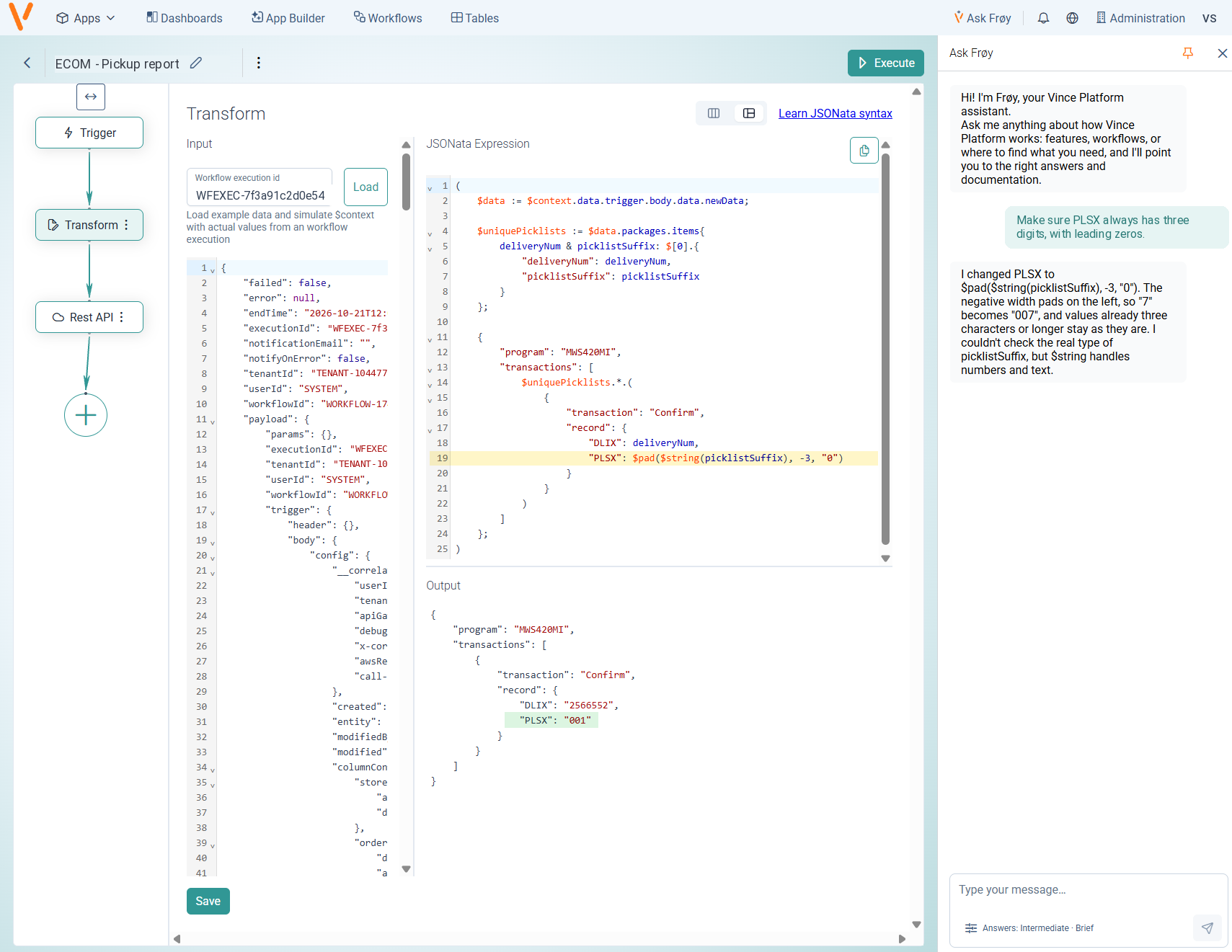
Example: “Why do I get a single object instead of a list when the order has one line?”
2. Understand an error message
Error messages are written for systems, not people. Open the page where the error appears and ask: “What does this error mean?” Frøy explains what went wrong and points you to the documentation page that helps.
3. Pick the right step for the job
Not sure whether you need a REST API step, a Transform or a Table Updater? Describe what you want to achieve, not how.
Example: “I want to fetch orders from an API and store them in a table. Which steps do I need?”
The more specific your goal, the better the answer. “Send an email when a workflow fails” works better than “How do emails work?”
4. Set up a connection to M3 or another system
Connections are where many first projects stall. Open the connection dialog and ask Frøy to walk you through it.
Example: “How do I set up a connection to Infor M3?”
Frøy guides you, but it never changes your settings. You stay in control of every field.
5. Find a setting without hunting through menus
Ask where something lives, and Frøy tells you. Answers come with buttons that open the documentation in a reader panel next to the chat, so you do not lose your place.
Example: “Where do I manage user roles?”
Bonus: make the answers fit you
Tell Frøy how familiar you are with the platform, from Just starting to I use this all the time. Beginners get step-by-step explanations, and experts get just the facts. Pick your department too, so examples and links match your work. You find the settings under the Answers button, below the message box.
Get started
Open the page you have a question about, then click Ask Frøy in the header. Read more about Ask Frøy in the documentation. Want to write JSONata that Frøy rarely needs to fix? Read the JSONata Masterclass.